Online Storage Rentals: Rent Your Storage Unit Today
Some storage needs come up quickly. Others you can plan ahead for. Either way, U-Store’s online storage rentals give you a straightforward path to find more storage space to support your DMV-area residence or business. Browse unit sizes, pick a move-in date, and handle your paperwork online, with no office visit required.
Rent Now or Reserve for Later? Here’s How to Decide
U-Store gives you two ways to secure a storage unit online: renting right away or reserving for a future date. Which one makes the most sense for you depends on how soon you plan to move in.
Renting now is the better fit if your move-in date is already set, you have your ID ready to upload, and you’d rather finish the whole process in one sitting. Your unit is secured as soon as your lease is signed and your order is processed.
Reserving for the future works well if you’re still comparing sizes or locations, or if you know you’ll need space soon but aren’t ready to move in yet. A reservation holds your chosen unit for a period of time without requiring payment upfront. You’ll complete payment closer to your scheduled move-in date instead.
Either path is handled entirely online, and U-Store’s team is available if questions come up along the way.
Find Online Storage Rentals at U-Store
Read our online storage rental guide below to get started renting with U-Store location close to you in the DMV today!
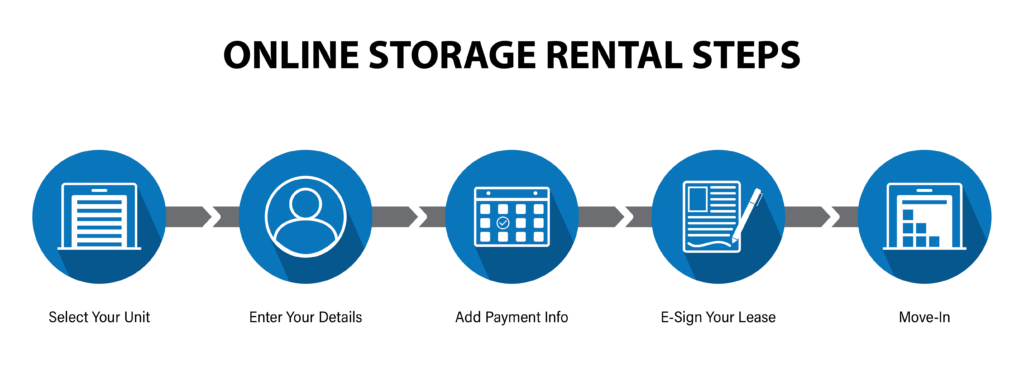
How to Rent a Storage Unit Online
- Choose your U-Store facility that is most convenient for you. Select a storage unit, and enter your email address.
- Enter the date your storage unit is needed.
- Choose a protection plan (note: if you choose to use your own protection plan, please email or mail-in a copy of your homeowners insurance declaration page ASAP).
- Fill out your contact info, and alternative contact info.
- Enter your payment info. Review your order, and process your order once complete.
- You should receive a follow-up email soon after. In that email, click “E-Sign Your Lease.”
- Click “Upload Documents.” Upload a valid and up-to-date copy of your driver’s license.
- Click “Sign Lease.” Fill out and sign all appropriate fields.
- Move into your storage unit on your selected move-in date.
How to Reserve a Storage Unit Online
- Choose your U-Store facility that is most convenient for you. Select a storage unit, and enter your email address.
- Enter your contact information, and choose a move-in date.
- Select a storage discount if applicable.
- A reservation holds your selected unit, and no payment is due at the time of reservation. However, you will need to complete payment before move-in to finalize your rental.
- Move into your storage unit on the selected move-in date.
*Note: No payment is required at the time of your reservation.
Not sure what size storage unit you need? Use U-Store’s convenient online storage calculator to help better determine how much storage space you will need. Input any items you plan on placing in your storage unit, and this handy calculator will provide you with an estimate as to how much storage space you will need. Use this estimate as a reference to select your correct storage unit size when renting online.
Tools to Help You Choose the Right Storage Unit
- Browse U-Store locations to find a facility near you in the DMV.
- Check our storage unit size guide to see common unit sizes and what they typically hold.
- Use the online storage calculator for a more specific size estimate based on the items you plan to store.
- Read U-Store’s self storage tips for general packing and planning advice.
- Visit the self storage FAQ if you have questions about the rental process itself.
Browse Available Storage Units at U-Store
From picking the right unit size to signing your lease, U-Store’s online storage rentals are built to save you time. Drive-up and temperature-controlled options, plus flexible month-to-month terms, mean you can find a setup that actually fits your needs. Rent your unit online now to lock in your move-in date.